Documents and templates
GeoTract keeps uploaded evidence and generated records with the business record they support. Open Documents for the cross-module workspace.
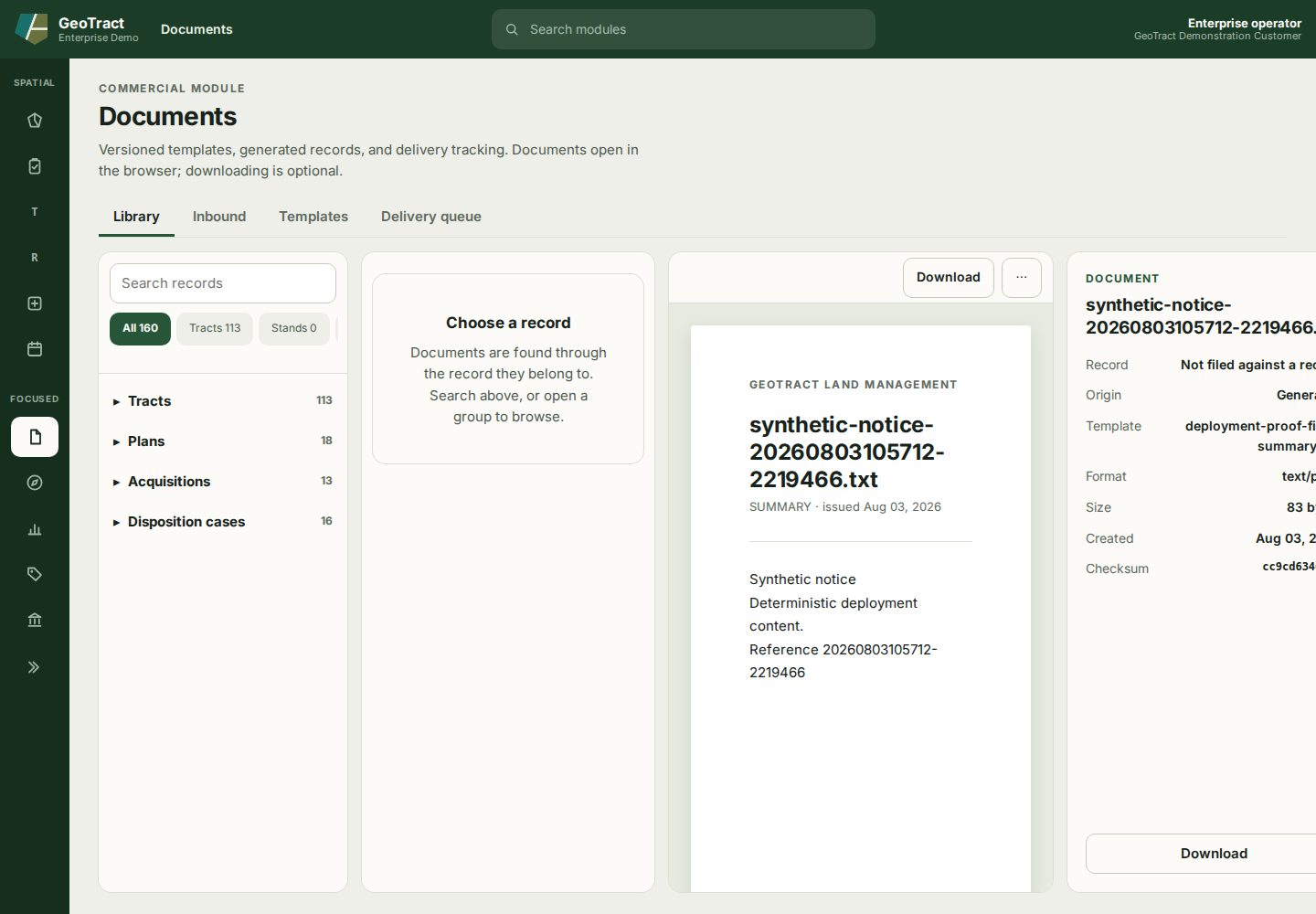
Find and read a document
- Select Library.
- Search records or choose a group such as Tracts, Plans, Acquisitions, or Disposition cases.
- Choose the owning record, then select its document.
- Read the document in the browser. Download only when needed.
- Use More document actions for actions such as Print or Open in new tab.
The metadata panel identifies the owning record, origin, template, format, size, creation date, and checksum.
Attach evidence
Open the owning tract, acquisition, work order, or other record and select Attach document. Choose an approved file and classification, save it, then reopen it in the Library. Do not upload credentials, executable files, or an unredacted document where its audience is broader than its contents.
Templates, inbound files, and delivery
- Inbound lists received material awaiting processing.
- Templates contains versioned generation definitions.
- Delivery queue shows generated-record delivery status.
When generating a board memo, LAS score sheet, or other record, review source fields first and inspect the output. Correct GeoTract and regenerate when source data is wrong; editing a downloaded copy does not update the system of record.